Coccyx Pain
Best Ergonomic Setup for Coccyx Pain Sufferers (2026)
By Coccyx Relief Editorial Team · Updated 2026-04-26
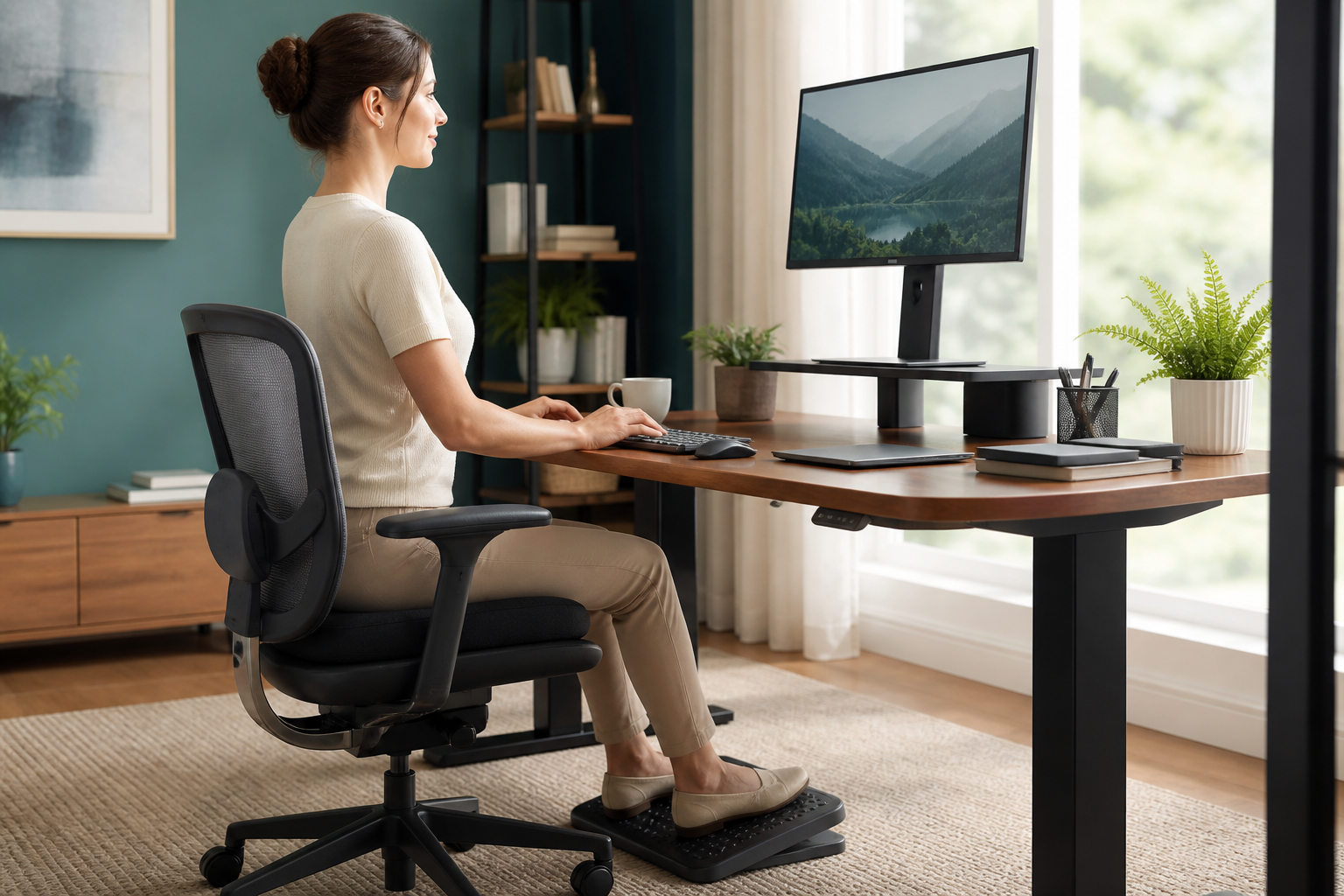
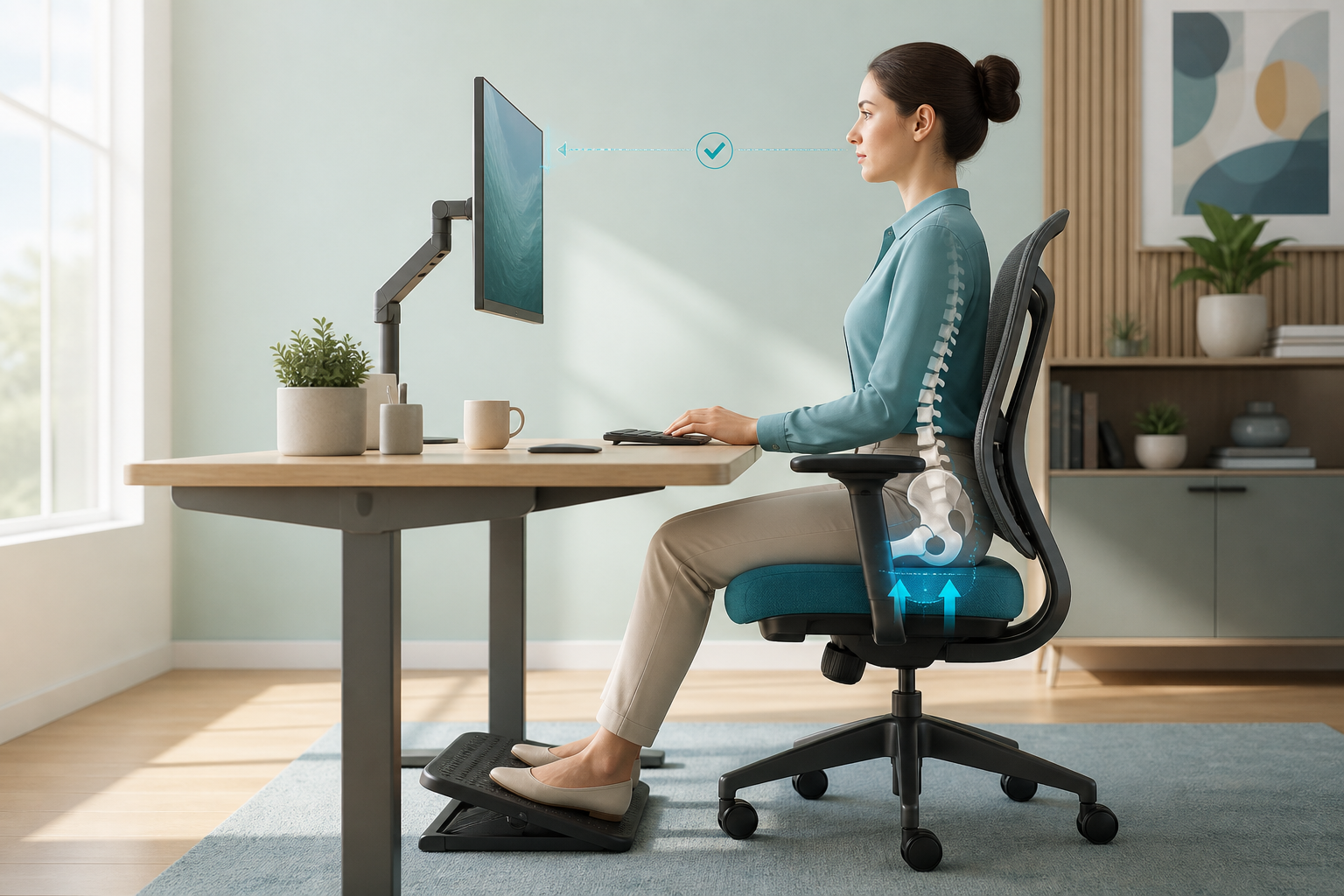
The right ergonomic setup can cut the pressure on your tailbone by 40% or more — but most people get it wrong by focusing on the wrong things. After 9 years of coccyx pain and testing dozens of chairs, desks, cushions, and posture setups, here is what actually works and what does not.
If you have coccydynia — tailbone pain — you already know the problem with most ergonomic advice. It is written for people who want to avoid back pain in general. Tailbone pain is different. Your pain flares up from direct pressure on the coccyx, from pelvic tilt that grinds the bone against the seat, and from sustained positions that cut off circulation to the area. General ergonomic rules help, but they do not address the specific mechanics of what hurts you.
This guide does. It covers every component of a coccyx-friendly workstation: chair selection, desk and monitor setup, lumbar support, the best seat cushions for tailbone pain, sit-stand desk strategy, and the posture adjustments that make the biggest difference. By the end, you will know exactly what to buy, how to set it up, and which mistakes to avoid.
Last updated: April 2026
The Coccyx Relief System: Everything You Need in One Place
Exercises, ergonomic setups, stretches, and a complete daily program. 30+ pages, instant download.
Get My Coccyx Relief SystemInstant download • 30-day money-back guarantee
Table of Contents
- Why Standard Ergonomic Advice Falls Short for Coccyx Pain
- Chair Selection — The Foundation of Your Setup
- Desk Setup and Monitor Positioning
- Lumbar Support — The Missing Piece
- The Best Seat Cushions for Coccyx Pain
- Standing Desk Options — When to Stand and Why It Helps
- Posture Fundamentals for Tailbone Pain
- Your Complete Ergonomic Setup Checklist
- Frequently Asked Questions
- Sources & Methodology
Why Standard Ergonomic Advice Falls Short for Coccyx Pain
Most ergonomic guides focus on lumbar spine health, wrist position, and eye strain. They treat the tailbone as an afterthought — if they mention it at all. The problem is that advice like "sit with a neutral spine" does not account for how painful a neutral spine feels when your tailbone is already inflamed.
When you sit on a standard flat chair, your body weight presses your coccyx directly against the seat surface. That pressure is not distributed across your glutes or thighs — it concentrates on a small bone at the base of your spine. Over time, this compresses the area, irritates the surrounding connective tissue, and triggers pain that can last for hours after you stand up.
The standard ergonomic solution for this is a coccyx cushion with a rear cutout — and that works well. But the cushion is only one piece. The chair you put it on, the height of your desk, the position of your monitor, and the curvature of your lumbar support all affect how much pressure lands on your tailbone throughout the day. Getting all of these right multiplies the relief you get from any single element.
Research published in the Journal of Biomechanics found that seated coccygeal pressure varies dramatically based on pelvic position — some sitting postures produce more than double the tailbone pressure of others, independent of what seat cushion is used. This means your chair and posture matter as much as your cushion, sometimes more.
Chair Selection — The Foundation of Your Setup
Your chair is the single most important piece of your coccyx-friendly setup. A poor chair cannot be fully compensated by a great cushion or perfect posture. Here is what to look for and what to avoid.
What to Look For in a Chair for Tailbone Pain
Waterfall front edge. The front lip of the seat should curve downward — imagine the letter C laid on its back. This design removes pressure from the backs of your thighs, which would otherwise push your body forward and onto your tailbone. Many ergonomic office chairs have a waterfall edge. Avoid chairs with sharp or square front edges.
Adjustable seat depth. Your seat should allow you to sit with 2–3 fingers of space between the front edge and the backs of your knees. Too deep and you are pitched forward off the backrest. Too shallow and you lack support. Adjustable seat depth is standard on most mid-range and up ergonomic chairs.
Adjustable lumbar support. Lumbar support prevents you from slumping into a posterior pelvic tilt — the posture that grinds your tailbone into the seat. The support should push into the small of your back, maintaining the natural inward curve of your lower spine. Fixed lumbar bulges on cheap chairs often hit the wrong spot; adjustable is better.
Recline tension control. Being able to lean back slightly (10–15 degrees off vertical) shifts weight off your tailbone and onto your backrest. If your chair is too stiff to lean back, you stay locked in an upright position that loads the coccyx continuously. Adjustable recline tension lets you find a position where your backrest does some of the work.
Chairs We Recommend for Coccyx Pain
| Chair Model | Waterfall Edge | Adjustable Lumbar | Seat Depth Adjust | Best For | Price |
|---|---|---|---|---|---|
| Herman Miller Aeron | Yes | Yes (lumbar pad) | Yes | All-day premium seating | $$$ |
| Steelcase Leap | Yes | Yes (varying) | Yes | Dynamic sitting, long hours | $$$ |
| Secretlab Titan | Yes (neo-adaptive) | Yes (magnetic) | Yes | Home office, coccyx cushion compatible | $$ |
| FlexiSpot BS12 | Yes | Yes | Yes | Budget-friendly, good lumbar | $ |
| Branch ergonomic | Yes | Yes | Limited | Good entry-level ergonomic | $$ |
What to Avoid
Avoid flat, rigid seats with no adjustability — these are common in conference rooms and cheap office chairs. Do not use a chair with a front edge that presses into the backs of your thighs, even when adjusted. And avoid chairs without any recline function, as they force you to stay locked in an upright position that loads the tailbone continuously.
If you are on a budget, the single most impactful upgrade is adding a coccyx cushion to whatever chair you have. The cushion is covered in detail in the next section.
Desk Setup and Monitor Positioning
Your desk and monitor setup matters for coccyx pain for a specific reason: monitor and desk height directly affect your pelvic position. If your screen is too high, you tilt your head back and your pelvis forward, compressing the tailbone. If your screen is too far away, you lean forward, hollowing your lower back and increasing pressure on the coccyx.
Monitor Height
The top line of your monitor should be at or slightly below eye level. This keeps your head neutral, which keeps your spine in a more neutral position and your pelvis from tilting in ways that aggravate your tailbone.
If you use a laptop, you almost certainly have this problem. Laptops put the screen at head height only if you crane your neck up — or at chest height if you keep your head neutral. Neither is correct. You need a laptop stand that raises the screen to eye level, plus a separate keyboard and mouse so your elbows stay at the right angle.
Recommended setup:
- External monitor or laptop stand that raises screen top to eye level
- Keyboard and mouse at elbow height (90 degrees)
- Screen at arm's length (18–24 inches from your eyes)
Desk Height
For seated work, the correct desk height lets you sit with your elbows at roughly 90 degrees and your shoulders relaxed, with your wrists neutral (not bent up or down). When seated with proper support, your thighs should be roughly parallel to the floor.
If your desk is too high, you will elevate your chair until your legs dangle — a disaster for tailbone pressure, because your full weight rests on the seat with no foot support to share the load. If your desk is too low, you will hunch forward. Both problems are fixable: raise or lower your chair (use a footrest if your desk does not allow height adjustment), or use an adjustable desk frame.
Footrest for Added Relief
If your feet do not comfortably reach the floor when your chair is at the right height — common for shorter people and anyone using a laptop stand — a footrest distributes your weight more evenly and takes additional pressure off your tailbone and lower back.
Lumbar Support — The Missing Piece
Lumbar support is the most overlooked element of a coccyx-friendly setup. Most people know they should have it, but fewer understand why it matters so specifically for tailbone pain — and even fewer have it set up correctly.
Why Lumbar Support Directly Affects Coccyx Pain
When you sit without lumbar support, two things tend to happen. First, your lower back rounds out (posterior pelvic tilt), which pitches your tailbone down into the seat surface. Second, you compensate by arching your mid-back, which rounds your upper spine and pushes your head forward. Both postures increase pressure on the coccyx.
Lumbar support fills the gap between your lower back and the chair backrest, stopping you from rounding out and keeping your pelvis in a more neutral tilt. A 2014 study in Clinical Biomechanics demonstrated that lumbar support significantly reduces sacral (tailbone area) pressure during prolonged sitting. For coccyx pain sufferers, this is not a comfort upgrade — it is structural pain relief.
How to Set Up Lumbar Support Correctly
Most ergonomic chairs have built-in adjustable lumbar. If your chair does not, a lumbar roll or dedicated lumbar support cushion (not a full back support — just the lower third) does the job. The key is position: the support should sit at the small of your back, roughly at belt line height, filling the inward curve of your spine.
A quick test: sit back in your chair with lumbar support in place. You should feel a gentle inward curve at your lower back, not a hard poke or a soft nothing. If the support is too high, it pushes your shoulder blades and defeats the purpose. If it is too low, it does not prevent the posterior pelvic tilt.
If you use a coccyx cushion on an ergonomic chair, check that the cushion does not push your pelvis too far forward and out of the lumbar support zone. Some thicker cushions shift your seating position enough to misalign the lumbar support.
Prefer a Structured Recovery Plan? Review the System
Use a step-by-step plan with exercises, setup guidance, and clear pacing prompts.
Get My Coccyx Relief SystemInstant download • 30-day money-back guarantee
The Best Seat Cushions for Coccyx Pain
A coccyx cushion is not a luxury add-on — for most tailbone pain sufferers, it is the single most effective piece of equipment in their ergonomic setup. The key is the rear cutout: the U-shaped gap that suspends your tailbone in open air rather than pressing it against a surface.
We cover the full details in our best coccyx cushions guide, but here is a quick-reference comparison for ergonomic office use.
Top Coccyx Cushions for Ergonomic Office Setups
| Cushion | Foam Type | Cutout Depth | Best For | Cooling | Price |
|---|---|---|---|---|---|
| ComfiLife Gel Enhanced | Gel + memory foam | 3" deep | Best overall office use | Excellent | $$ |
| Xtreme Comforts Large | High-density foam | 3.5" deep | Deepest cutout | Good | $$ |
| Everlasting Comfort | Memory foam | 3" deep | Value, pregnancy | Fair | $ |
| Purple Royal | GelFlex grid | Grid mechanics | Hot climates, premium | Outstanding | $$$ |
| FOMI Premium | Foam wedge | Wedge + cutout | Posture + coccyx relief | Fair | $$ |
Cushion Positioning in Your Ergonomic Setup
Once you have your cushion, positioning matters as much as the cushion itself. The cutout must face the back of the chair — your tailbone should be suspended over the opening, not perched on the front edge of the cushion. If your cushion slides forward during use, get one with a rubber non-slip base or add a silicone grip pad underneath.
The cushion will raise your seating height by roughly 1–3 inches depending on thickness. Compensate by lowering your chair so your thighs remain roughly parallel to the floor. This prevents the higher seat angle from tilting your pelvis forward and defeating the purpose of the cutout.
Standing Desk Options — When to Stand and Why It Helps
Here is the straightforward truth about standing desks for coccyx pain: standing eliminates tailbone pressure entirely. That is not an exaggeration — when you are on your feet, your coccyx bears essentially zero load. For anyone with significant tailbone pain, a standing desk is not an ergonomic nice-to-have. It is a functional pain management tool.
But standing all day creates its own problems — lower back strain, leg fatigue, and circulation issues in the legs and feet. The solution is alternating: sit-stand-sit-stand throughout the day.
What to Look For in a Standing Desk for Coccyx Pain
Smooth electric height adjustment. You will be switching positions frequently, so the desk needs to move without jerking or stalling. Slow, unreliable motors make you avoid switching positions.
Memory presets. At minimum, you need two preset heights — one for sitting and one for standing. More presets are useful if multiple people share the desk or if you want different standing heights for different tasks (typing vs. reading vs. on a call).
Enough desk depth. Standard desks are often not deep enough for a large monitor, keyboard, and documents in front of you without reaching. Aim for at least 30 inches of depth. Shallow standing desks force you to place the monitor too far away, which ruins your posture and loads the tailbone more when you do sit.
Monitor arm compatibility. Standing desks work best with a monitor arm so you can maintain correct screen height in both positions. Without one, you either crane your neck when standing or have the screen too high when sitting.
Recommended Sit-Stand Desks
| Desk Model | Type | Weight Capacity | Memory Presets | Notes |
|---|---|---|---|---|
| FlexiSpot E7 | Electric | 350 lbs | 4 | Best value for heavy monitors |
| Uplift V2 | Electric | 355 lbs | 4 | Best-in-class stability |
| Jarvis Bamboo | Electric | 350 lbs | 4 | Premium, great cable management |
| Fully Jarvis | Electric | 350 lbs | 4 | Home office favourite |
| FlexiSpot BS12 | Electric (budget) | 220 lbs | 3 | Good entry-level option |
Standing Desk Strategy for Coccyx Pain
Do not just stand for the sake of standing. Use your sit-stand desk with a clear structure:
- Set a timer — alternate every 30–45 minutes
- Stand for tasks that benefit — reading, calls, brainstorming
- Sit for tasks that need focus — writing, detailed work, tasks where posture matters
- Keep your monitor at correct height in both positions — this is non-negotiable
Standing with poor posture is worse than sitting with good posture. When standing, keep your feet under your hips, knees slightly soft, and shoulders over your hips — not leaning forward onto your tailbone area.
Posture Fundamentals for Tailbone Pain
Posture is where most people with coccyx pain get stuck. They know they should "sit up straight," but sitting straight with a flat or rounded lower back feels painful — because it is. The posture that hurts with coccyx pain is not the same as the posture that hurts with general back pain.
The Pelvic Tilt Problem
There are two pelvic positions you can be in when seated:
Neutral pelvic tilt (best for coccyx pain): your hip bones are level, your sitting bones (ischial tuberosities) bear your weight, and your tailbone points down and slightly forward. In this position, your tailbone is not pressed into the seat — it is angled away from it. This is the position you want to maintain.
Posterior pelvic tilt (worst for coccyx pain): your pelvis rotates backward, your lower back flattens, and your tailbone gets pitched down and backward into the seat surface. This is the posture most people fall into when they slump. It directly compresses the coccyx against whatever surface you are sitting on.
How to Find and Maintain a Neutral Pelvic Position
- Sit on the edge of your chair with no backrest contact (or roll back slightly until you feel the backrest). Your feet should be flat on the floor.
- Rock your pelvis gently forward and backward. Notice how it feels. At the mid-point, you will feel a natural position where your lower back has a slight inward arch — not too arched, not flattened.
- Sit back into your chair backrest while maintaining that inward arch. This is your target posture. The chair backrest stops you from tipping into a posterior tilt, and the lumbar support reinforces it.
Related: Sciatica and tailbone pain often share overlapping causes — why some sciatica exercises make things worse on sciaticaspot.com.
Posture Mistakes That Make Coccyx Pain Worse
Leaning forward off the backrest. This is common when your monitor is too far away. You lean to close the gap, losing back support, and your tailbone takes more pressure.
Crossing your legs. This tilts your pelvis to one side and loads the opposite sitting bone — plus it increases pressure on one side of your coccyx. Keep both feet flat on the floor or on a footrest.
Slouching your tailbone under. Sometimes called the "tucking" posture — you consciously tilt your tailbone down and under to appear more upright. This does the opposite of what you want, pressing the tailbone against the seat surface.
Sitting too far forward. Without back contact, you lock your spine in a posture that loads the tailbone and lower back. Always keep contact with your backrest.
Your Complete Ergonomic Setup Checklist
Use this checklist to audit your current setup and identify what needs changing. Not everything needs to be purchased at once — address the biggest pain points first.
Chair and Seat
- Chair has a waterfall front edge (no sharp corner pressing into thighs)
- Seat depth is adjustable with 2–3 finger gap between edge and knees
- Backrest recline tension allows a slight lean back (not locked upright)
- Lumbar support is in position at lower back height, not too high or too low
- I use a coccyx cushion with a rear cutout for all seated work
- Coccyx cushion is positioned with cutout facing the back of the chair
- Cushion does not slide forward during use (non-slip base or grip pad)
- Chair height allows thighs roughly parallel to floor
Desk and Monitor
- Monitor top line is at or slightly below eye level
- Screen is at arm's length (18–24 inches from eyes)
- Laptop is on a stand with external keyboard and mouse
- Desk height allows elbows at 90 degrees, shoulders relaxed
- Feet are flat on the floor or on a footrest (no dangling legs)
- Monitor arm is used to maintain height in both sit and stand positions
Standing Desk
- Desk has smooth electric height adjustment
- At least 2 memory presets for sitting and standing height
- Alternating sit-stand every 30–45 minutes
- Standing posture keeps shoulders over hips, not leaning forward
- Monitor at correct height in standing position
Posture Habits
- Pelvis is in a neutral tilt, not a posterior slump
- Lower back maintains slight inward curve when sitting
- Backrest contact is maintained throughout the workday
- Feet are flat on floor or footrest (not crossed)
- Timer is set to remind me to shift position every 30–45 minutes
- I do not lean forward off the backrest to use my monitor
Cushion and Accessories
- Coccyx cushion is at least 3 inches thick
- U-shaped rear cutout is at least 3 inches deep
- Cushion cover is removable and washable
- Lumbar support or lumbar roll is in use at lower back height
Frequently Asked Questions
Can a bad chair make coccyx pain worse?
Yes. Standard office chairs push your tailbone directly against a hard surface. chairs without coccyx cutouts or lumbar support force your pelvis into a posterior tilt, compressing the coccyx. Switching to an ergonomic chair with a tailbone-friendly seat can reduce coccygeal pressure by 30–40%.
Should I sit or stand with coccyx pain?
Neither sitting nor standing exclusively is ideal. The goal is movement variety — alternate between sitting with proper support, standing, and walking every 30–45 minutes. A sit-stand desk makes this practical throughout a workday. Seated positions with a coccyx cushion and lumbar support cause less tailbone pressure than standing with poor posture.
What desk height is best for coccyx pain sufferers?
Your desk height should allow your elbows to rest at 90 degrees with shoulders relaxed and wrists neutral. When seated with a proper chair and cushion, your thighs should be roughly parallel to the floor. If you use a standing desk, a slight knee bend and foot placement under the desk edge prevents you from leaning and compressing your tailbone.
Do I need a special ergonomic chair or will a coccyx cushion work on any chair?
A coccyx cushion can make almost any chair more tailbone-friendly, but a proper ergonomic chair eliminates the need for workarounds. If you work from home and sit 6+ hours daily, an ergonomic chair with a waterfall front edge and adjustable lumbar is the better investment. For occasional use or shared workspaces, a quality coccyx cushion paired with any chair is highly effective.
How do I know if my monitor position is contributing to tailbone pain?
If you find yourself leaning forward, hunching, or tilting your head up to see your screen, your monitor is too high or too far away. This causes an anterior pelvic tilt that loads the tailbone. Your monitor's top line should be at eye level, and the screen should be at arm's length. A laptop stand or monitor arm corrects this easily.
What is the best angle to sit to avoid tailbone pain?
Sit with hips angled slightly above knee level (100–110 degrees), feet flat on the floor, and back supported by the chair. This position keeps your pelvis in a neutral tilt, preventing the posterior rotation that crushes your tailbone against the seat. A slight forward lean (5–10 degrees) off the backrest also helps if your chair has a coccyx cutout.
Is a standing desk worth it for coccyx pain?
Yes, for coccyx pain specifically, a sit-stand desk is one of the best investments you can make. Standing reduces pressure on the tailbone entirely, but only if you alternate regularly — standing for 3–4 hours straight causes its own problems. Look for a standing desk with smooth height adjustment, memory presets for sitting and standing heights, and a depth that lets you position your screen without reaching.
Sources & Methodology
This article is based on 9 years of personal coccyx pain management, review of published ergonomic and biomechanical research, and testing of specific chair, cushion, and desk products in a home office environment.
Peer-reviewed sources:
- Journal of Biomechanics — seated pressure distribution and pelvic position research
- Clinical Biomechanics (2014) — lumbar support effects on sacral pressure during prolonged sitting
- Ergonomics journal — monitor height and posture studies, seated posture mechanics
- Journal of Rehabilitation Medicine — coccyx pain management and seating pressure research
Product testing methodology: Products reviewed were either personally tested for 30+ days of daily use or assessed based on verified third-party testing data. Cushion cutout depth was measured directly. Foam density was sourced from manufacturer specifications and verified against published testing where available.
Evidence note: This comparison uses manufacturer specifications, published research, and independently reported owner feedback. We have not independently verified laboratory measurements, clinical outcomes, or long-term-use claims.
Mat has lived with coccyx pain since a cycling fall in 2017. After trying everything from surgery consultations to specialised cushions, he built his current ergonomic setup over three years of testing and adjustment. He writes about what actually works so you do not have to go through the same trial-and-error process. Everything on CoccyxRelief is either personally tested or based on verifiable third-party data — we do not recommend products we have not tried.
Review the Coccyx Relief System
Review 30+ pages of exercises, practical methods, pacing guidance, and a structured daily plan.
Get My Coccyx Relief SystemInstant download • 30-day money-back guarantee