Coccyx Pain
Office Ergonomics for Coccyx Pain: Full Setup Guide (2026)
By Coccyx Relief Editorial Team · Updated 2026-03-01
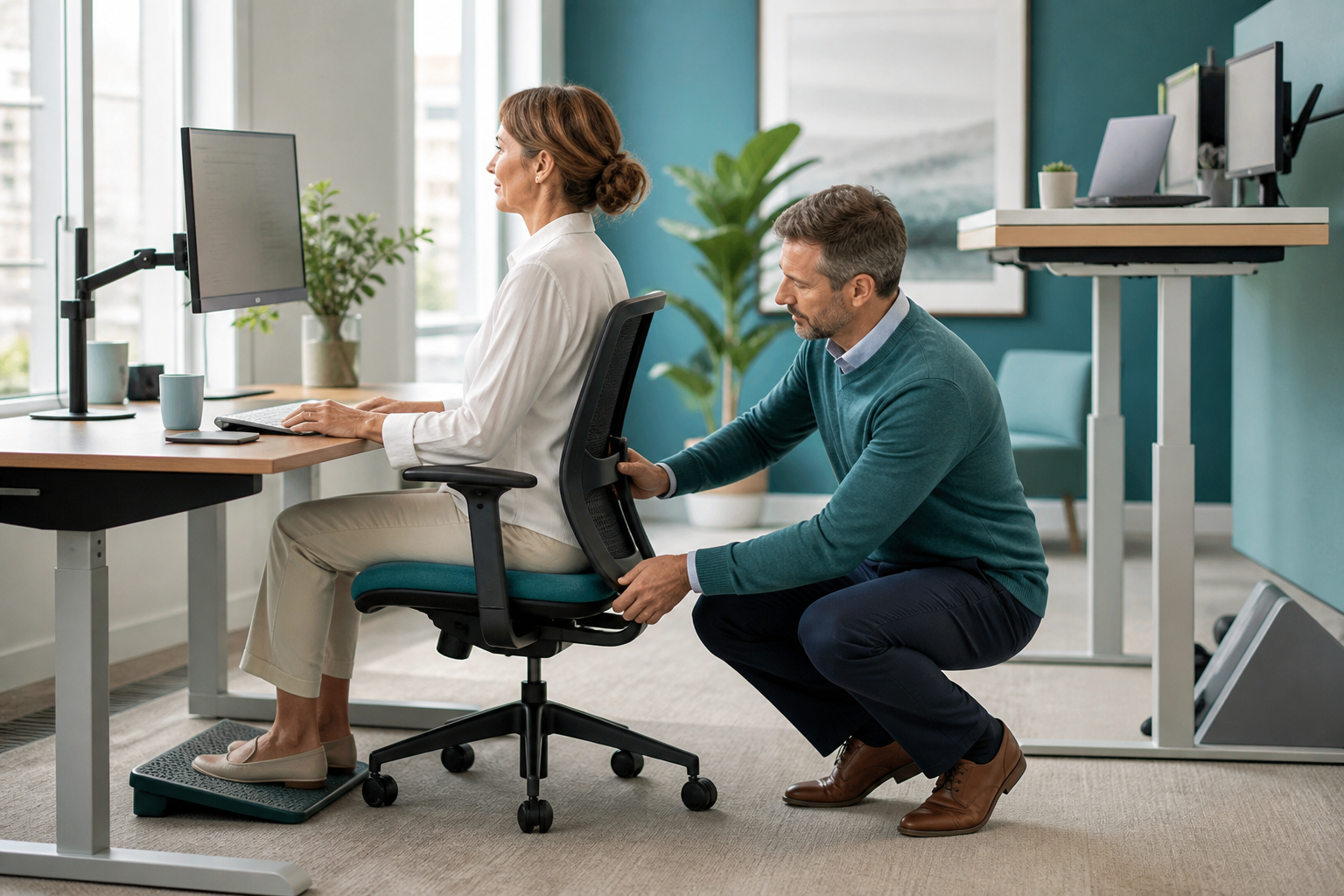
The right office ergonomics setup can reduce coccygeal pressure by over 50% compared to a standard unadjusted workstation. For people with tailbone pain, this translates directly into longer comfortable working hours, less end-of-day pain, and faster recovery.
This guide walks through every element of your office setup from the cushion up.
The Coccyx Relief System: Everything You Need in One Place
Exercises, ergonomic setups, stretches, and a complete daily program. 30+ pages, instant download.
Get My Coccyx Relief SystemInstant download • 30-day money-back guarantee
Table of Contents
- The Core Principle: Offload the Coccyx
- The Coccyx Cushion: Your First Priority
- Chair Setup and Adjustment
- Desk Height and Monitor Position
- Standing Desks for Coccyx Pain
- Keyboard and Mouse Position
- Movement Breaks: The Most Important Habit
- The 60-Second Ergonomic Check
- Ergonomic Accessories Worth Buying
- Home Office vs Commercial Office
- Frequently Asked Questions
The Core Principle: Offload the Coccyx
Every ergonomic recommendation in this guide serves one primary goal: remove or reduce direct pressure on the coccyx while maintaining the posture and support needed for productive work.
Two mechanisms cause sitting-related coccyx pain:
- Direct pressure: The tailbone makes contact with the seat surface and bears load it was not designed for
- Posterior pelvic tilt: Slumped sitting rotates the pelvis backward, shifting more weight onto the coccyx
Good ergonomics addresses both.
The Coccyx Cushion: Your First Priority
Before adjusting anything else, install a coccyx cushion. This single change provides more relief than any chair adjustment for most people with active coccydynia.
What to look for
U-shaped rear cutout (essential) The cutout must be deep enough that your coccyx is suspended in the gap without contact. Minimum cutout depth: 3 inches. For larger builds: 3.5 inches.
High-density foam (45+ kg/m³) Low-density foam compresses fully within an hour. You need foam dense enough to maintain the cutout gap throughout an 8-hour workday.
Non-slip base Your cushion will slide on any smooth chair surface without this. A silicone-dot or rubber base is essential for an office setup.
Minimum 3 inches thick Thinner cushions bottom out. 3–3.5 inches maintains the protective gap under load.
Positioning the cushion
- Place the cushion with the U-cutout facing the chair backrest
- Sit fully back in the chair — your back should contact the backrest, not hover in front of it
- Your coccyx should hover over the open cutout — not be resting on the cushion's rear edge
- After sitting, verify: can you feel direct tailbone contact with the cushion? If yes, the cushion is either backward, too thin, or the cutout is too shallow
Chair Setup and Adjustment
Seat Height
Target: Feet flat on the floor, knees at approximately 90°, thighs parallel to the floor or angled very slightly downward.
Why it matters for coccyx pain: When seat height is correct, body weight is distributed across the thighs as well as the sitting bones. When the chair is too high, weight concentrates on the sitting bones and coccyx. When too low, hip flexion increases and posterior pelvic tilt worsens.
After adding a coccyx cushion: Lower your chair height by approximately the thickness of the cushion (typically 2.5–3 inches after compression). This is one of the most commonly missed adjustments.
Forward Seat Tilt
If your chair has a forward seat tilt mechanism, activate it. Even a 3–5° forward tilt shifts the pelvis from posterior tilt (coccyx-loading) to neutral or slight anterior tilt (thigh-loading). This can be the single most effective chair adjustment for coccyx pain.
Chairs with good forward tilt: Saddle chairs, Humanscale Freedom, Branch Ergonomic Chair, most quality ergonomic chairs from $300+.
Seat Depth
Target: 2–3 finger-widths of gap between the front edge of the seat and the back of your knees.
Too much seat depth (sitting too far back) forces you to slide forward, losing lumbar contact and increasing posterior pelvic tilt. Too little depth (sitting too close to the front) reduces thigh support and concentrates weight on the sitting bones.
Lumbar Support
Lumbar support should contact the curve of your lower back at L3–L4 — roughly where you would place your hand to support your lower back.
Not too high: Supporting the upper lumbar or thoracic spine is ineffective
Not too low: Supporting only the sacrum pushes the pelvis into tilt
Adequate lumbar support is essential for maintaining the neutral pelvic position that keeps weight off the coccyx.
Desk Height and Monitor Position
Desk Height
With your chair at the correct seat height:
- Your elbows should rest at approximately 90° with shoulders relaxed when hands are on the keyboard
- Most adjustable desks work best at 65–75 cm (26–30 inches) for seated use
- After adding a coccyx cushion and re-adjusting your chair, reassess desk height — you may need to raise the desk
Monitor Height
- Top of the monitor should be at or very slightly below eye level
- Monitor at arm's length (50–70 cm) from your eyes
- Screen tilted back 10–20° to match your natural downward gaze
Why this matters for coccyx pain: A monitor that is too low causes you to lean forward and round your upper back. This slouch leads to posterior pelvic tilt — the posture that loads the coccyx most. A correctly positioned monitor helps maintain the upright posture that keeps weight on the thighs.
Prefer a Structured Recovery Plan? Review the System
Use a step-by-step plan with exercises, setup guidance, and clear pacing prompts.
Get My Coccyx Relief SystemInstant download • 30-day money-back guarantee
Standing Desks for Coccyx Pain
A height-adjustable standing desk is one of the best investments for anyone with coccyx pain who works at a computer.
Benefits
- Allows you to remove all sitting-related coccyx pressure during standing intervals
- Enables flexible movement scheduling throughout the day
- Promotes natural posture variation
How to use it effectively
Not all standing — alternating Standing all day is not the goal. It creates its own problems: foot and ankle pain, venous pooling, lower limb fatigue. The goal is cycling between sitting and standing.
Recommended schedule:
- 45–60 minutes sitting → 15–20 minutes standing → repeat
- Listen to your body — if coccyx pain escalates while sitting, switch earlier
Standing posture matters too When standing at your desk:
- Stand on an anti-fatigue mat
- Weight evenly distributed on both feet
- Avoid locking your knees
- Avoid leaning heavily on one hip
Which standing desk to buy
Look for: smooth, reliable height adjustment (electric preferred over manual for all-day use), stable enough to not wobble at desk height, good height range matching your seated and standing heights. Flexispot, UpDesk, and Fully are reliable mid-range brands.
Keyboard and Mouse Position
Keyboard and mouse position matters for coccyx pain because poor upper-limb ergonomics leads to compensatory postures that cascade into pelvic tilt.
Keyboard
- Directly in front of you
- Close enough that your arms are not reaching forward (reaching causes shoulder rounding → thoracic kyphosis → posterior pelvic tilt)
- Wrists neutral, not flexed upward
Mouse
- Same height as keyboard, within comfortable reach without reaching across your body
- Consider a vertical mouse — reduces forearm rotation that can cause compensatory shoulder position
Movement Breaks: The Most Important Habit
The single most evidence-backed ergonomic intervention for coccyx pain is timed movement breaks. No chair or cushion can compensate for 6 continuous hours of static sitting.
Target: Stand and move for 5 minutes every 45–60 minutes
What to do during your break
- Stand and walk — even to the kitchen and back
- Pelvic tilts — 10 gentle forward-and-back pelvic rocks
- Hip flexor stretch — lunge position, 20 seconds each side
- Shoulder rolls — releases upper body tension that contributes to thoracic posture
- Gentle cat-cow — if you have space, 5 cycles mobilises the entire spine
Tools to enforce breaks
- Phone alarm every 45 minutes
- Break reminder apps (Stretchly, Stand Up, Time Out)
- Smart watch movement alerts
- Post-it note on your monitor as a physical reminder
The 60-Second Ergonomic Check
Do this at the start of every work session:
- ✅ Coccyx cushion in place, U-cutout facing the backrest
- ✅ Sitting fully back in the chair — back touching the lumbar support
- ✅ Feet flat on the floor
- ✅ Knees at approximately 90°
- ✅ Elbows at 90° with hands on keyboard
- ✅ Monitor at eye level, arm's length away
- ✅ Shoulders relaxed — not elevated or rounded forward
- ✅ Move timer set for 45–60 minutes
This takes 60 seconds and prevents you from defaulting into a pain-generating posture within the first 10 minutes of your session.
Ergonomic Accessories Worth Buying
| Accessory | Cost | Benefit for Coccyx Pain |
|---|---|---|
| Coccyx cushion | $30–$60 | Essential — most direct benefit |
| Footrest | $30–$60 | Helps when chair cannot be lowered enough |
| Monitor arm | $50–$100 | Precise height adjustment for monitor |
| Lumbar cushion | $20–$40 | If chair's built-in lumbar is inadequate |
| Anti-fatigue mat | $50–$100 | Reduces fatigue during standing desk intervals |
| Vertical mouse | $40–$80 | Reduces compensatory shoulder tension |
Home Office vs Commercial Office
Home office: more control
The home office environment allows full control over every ergonomic variable. Use this advantage:
- Choose your chair carefully
- Install a standing desk if possible
- Set up your monitor at exactly the right height
- Keep your coccyx cushion permanently in your work chair
Commercial office: advocate for yourself
In a shared office environment:
- Bring your own coccyx cushion — keep it at your desk
- Request an ergonomic assessment (many employers are required to provide these)
- Request adjustable furniture — most quality offices have height-adjustable desks available on request
- Use the bookable meeting rooms for standing calls
Frequently Asked Questions
What office chair is best for coccyx pain? Chairs with forward seat tilt, adjustable seat depth, and genuine (not decorative) lumbar support. The Humanscale Freedom, Herman Miller Aeron, Sihoo M57, and Branch Ergonomic Chair are top performers. Pair any quality chair with a coccyx cushion for best results.
Is a standing desk worth it for coccyx pain? Yes, for anyone who works at a computer for 6+ hours daily. The ability to alternate between sitting and standing is one of the most effective ergonomic interventions for coccyx pain management.
Can I use a coccyx cushion at a standing desk? No — coccyx cushions are for sitting only. At a standing desk, use an anti-fatigue mat instead.
How quickly will ergonomic changes help my coccyx pain? Many people notice improvement within 1–2 days of implementing the full setup (cushion + correct chair adjustment + movement breaks). Significant ongoing improvement typically takes 2–4 weeks. Ergonomic changes do not replace physiotherapy for chronic coccydynia but complement it significantly.
Review the Coccyx Relief System
Review 30+ pages of exercises, practical methods, pacing guidance, and a structured daily plan.
Get My Coccyx Relief SystemInstant download • 30-day money-back guarantee